Keep your name, job information, and contact details up to date in My Profile.
Before you begin
Sign in to your own SignDex account.
Edit your details
- Select your name or profile entry in the application navigation.
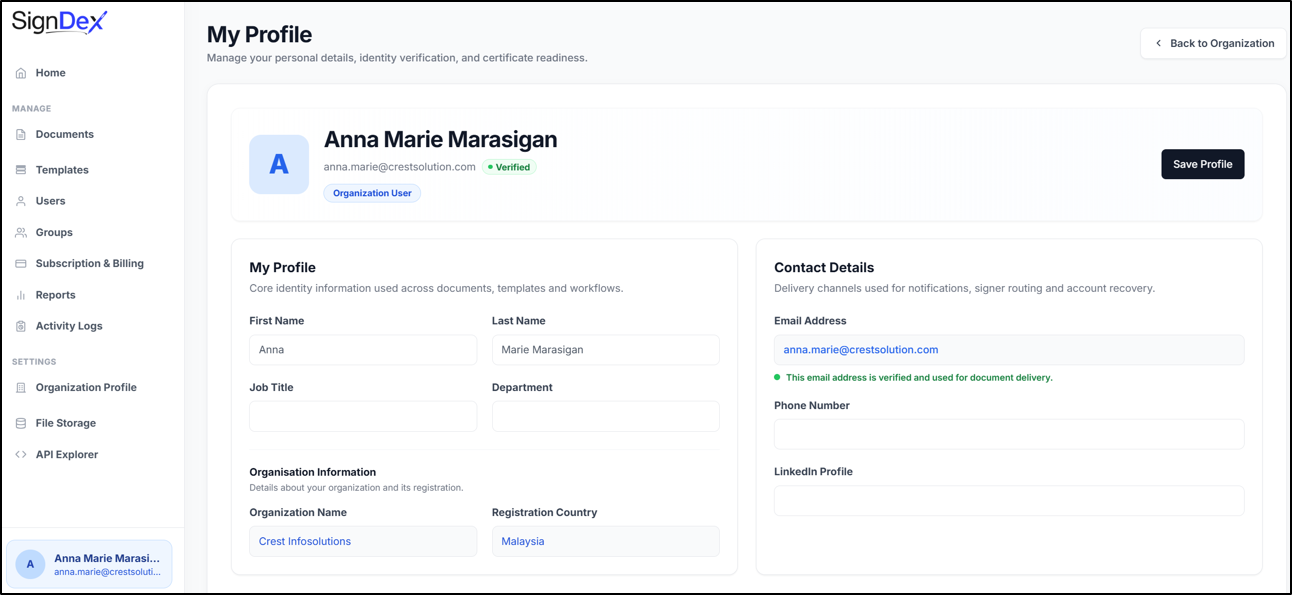
- On My Profile, review First Name and Last Name.
- Update Job Title and Department as needed.
- Under Contact Details, update Phone Number and LinkedIn Profile if appropriate.
- Review your changes and select Save Profile.
- Reopen My Profile and check that the values have been retained.
Understand fields you cannot edit
Organization Name and Email Address are read-only in the member profile inspected for this guide. The page also displays the registration country. If these details need correction, contact your organisation administrator or SignDex support.
If you see an access message
Some organisation pages are restricted to owners and administrators. A member can use My Profile for personal settings. Ask an administrator to handle organisation settings that your role cannot access.
Check your progress
Your profile should display the details you intended to save. If it does not, note any validation message and try again after correcting the affected field.