
Use API Explorer to find SignDex API operations, inspect request and response examples, and try a request from the portal.
Before you begin
Use an account that can open API Explorer. For testing, use an approved test environment and data you are authorised to access. Explorer can use a browser session or an API key and secret for authenticated requests.
Find an endpoint
- Open navigation and select API Explorer under SETTINGS.
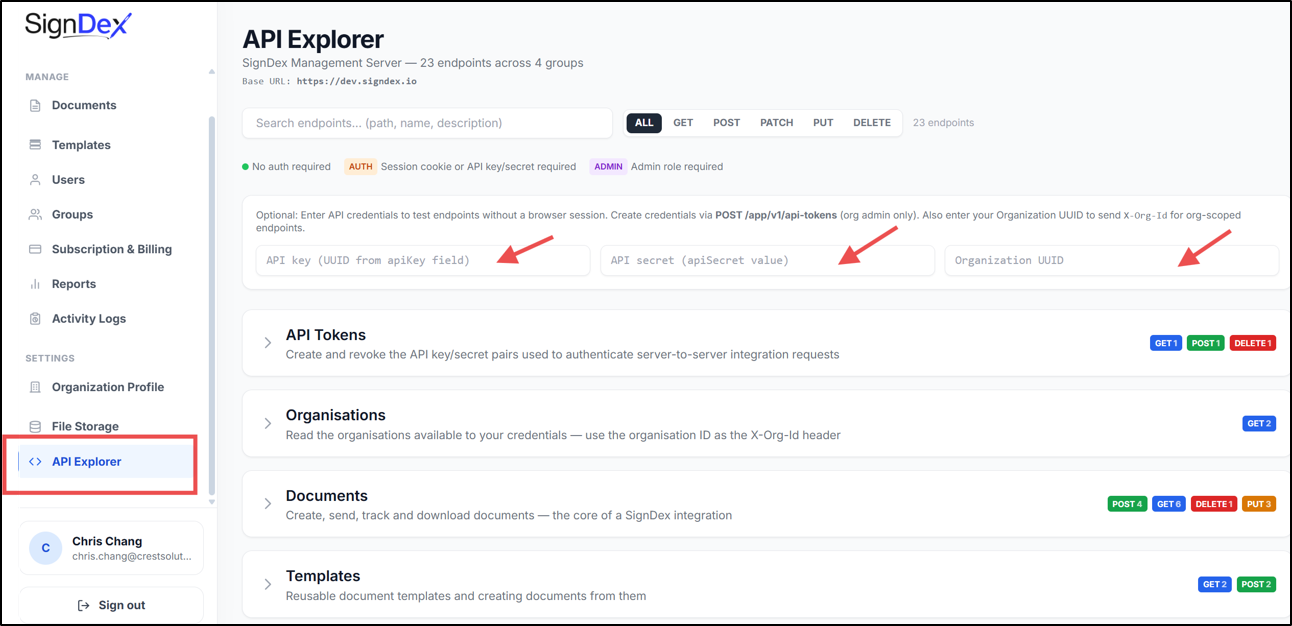
- Check the Base URL at the top of the page. Requests must target the environment you intend to use.
- Use the search field to locate an operation, or select a method filter such as GET or POST. Select ALL to show all methods again.
- Expand a relevant group: API Tokens, Organisations, Documents, or Templates.
- Select an endpoint to expand its documentation.
- Review its Endpoint URL, description, authentication requirement, and any REQUEST BODY and RESPONSE examples.
The Explorer deep link opens that specific documentation entry. Use it when directing a colleague to an operation; use the Endpoint URL when configuring an API request.
Understand access requirements
The legend distinguishes operations requiring no authentication, AUTH operations that require a session cookie or API key/secret, and ADMIN operations requiring an admin role. Read the operation’s description as well: credential creation is marked AUTH, but its description additionally restricts it to organisation owners and admins.
The optional credential area supports testing without a browser session. Supply your approved API credentials there when needed. For organisation-scoped requests, enter the Organization UUID so Explorer can send X-Org-Id. Find the UUID in Organization Profile.