
Managing your subscription in SignDex is designed to be flexible, so you can adjust your plan anytime as your team size, usage, or workflow needs change. Whether you need more advanced features or want to scale down, upgrading or downgrading can be done directly from your account settings.
This guide walks you through how it works and what happens when you switch plans.
Where to Manage Your Subscription
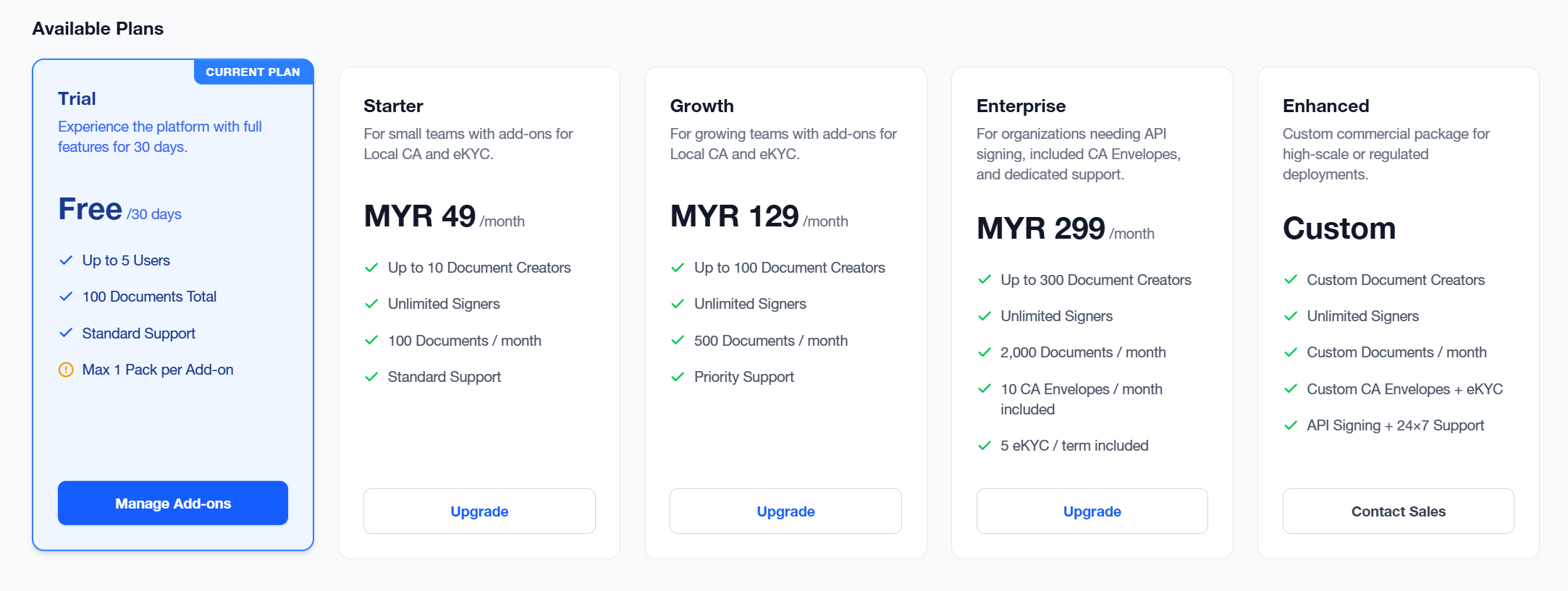
To begin, go to your SignDex account dashboard and navigate to:
Subscription Plans
From here, you can view:
- Your current plan
- Available upgrade or downgrade options
How to Upgrade Your Subscription
Upgrading is useful when you need more capacity, advanced features, or additional users.
Steps to upgrade:
- Go to Subscription Plans
- Select the new plan that fits your needs
- Click on Upgrade
- Review pricing and features
- Confirm payment
What happens after upgrading:
- Your new plan will be reviewed and approved by Super Admin
- You gain access to new features after approval
- Billing is adjusted based on the remaining time in your cycle (prorated in most cases)
- Your next renewal reflects the upgraded plan
How to Downgrade Your Subscription
Downgrading is ideal when you want to reduce costs or switch to a simpler plan.
Steps to downgrade:
- Go to Subscription plans
- Choose a lower-tier plan
- Select Downgrade
- Review feature differences
- Confirm the downgrade request
What happens after downgrading:
- Your current plan remains active until the end of your billing cycle
- The lower plan takes effect in the next billing period
- You may lose access to certain premium features based on the new plan
- Your documents and data remain safe and unchanged
This ensures you continue working without disruption until the switch happens.
Key Differences: Upgrade vs Downgrade
- Upgrade: Access to higher-tier features after approval
- Downgrade: Applies at the next billing cycle
- Billing impact: Upgrades are typically prorated; downgrades apply later
- Access continuity: No interruption to active workflows in both cases
Important Things to Note
- You can change plans at any time while your subscription is active
- Billing adjustments depend on your billing cycle (monthly or yearly)
- Your documents, templates, and audit logs remain intact even after plan changes
- Some advanced features may be restricted if you move to a lower plan