
Document workflow roles explain who prepares a document and what each participant needs to do. Use this guide to understand the Sender and the recipient options Needs to Sign, Needs to Approve, and Receives a Copy. The Sender prepares and sends the workflow; the recipient dropdown determines what each recipient does.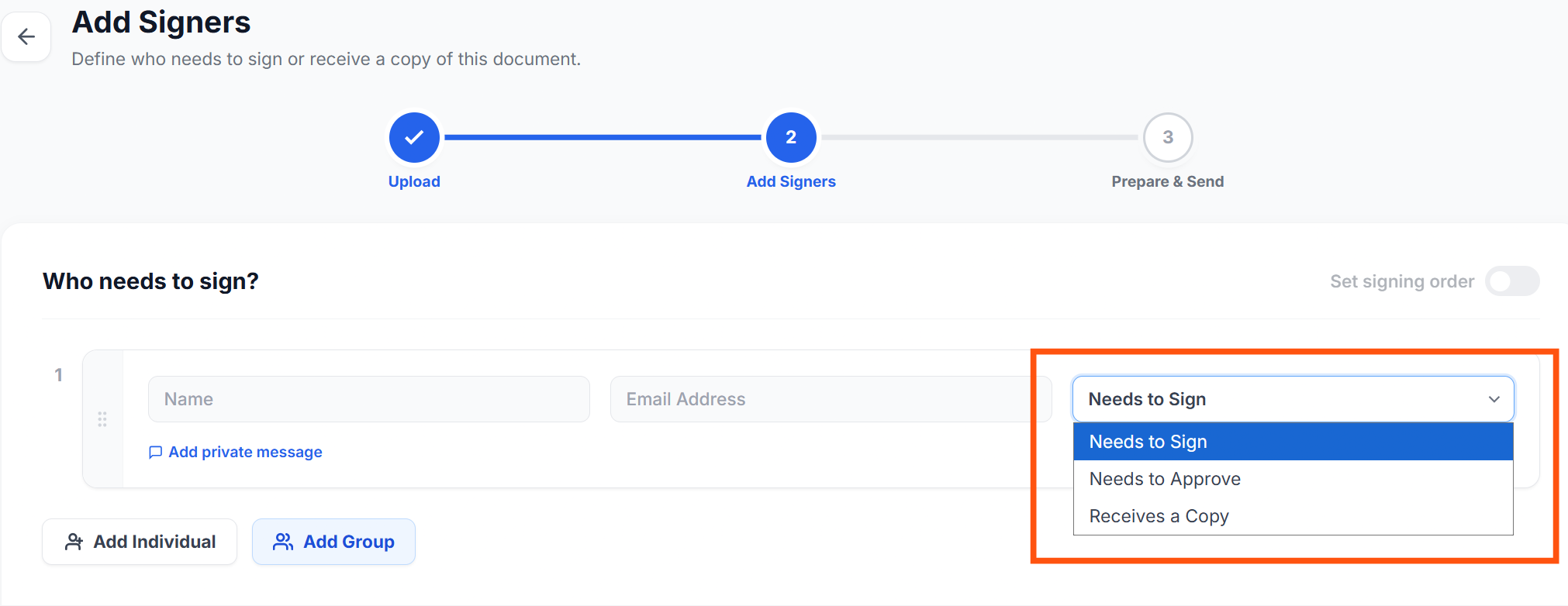
These are document workflow roles. Organisation account roles, such as Admin and Member, control access to organisation features and settings.
Compare the roles
| Role | Purpose | Action |
|---|---|---|
| Sender | Prepares the document and starts the workflow. | Adds recipients, assigns their roles, prepares fields, configures the workflow, and sends the document. |
| Signer (Needs to Sign) | Signs the document. | Reviews the content, completes required fields, and submits their signature. |
| Approver (Needs to Approve) | Reviews the document and makes an approval decision. | Reviews the content and approves or rejects it. |
| Copy recipient (Receives a Copy) | Receives the completed document for reference. | Receives the copy after the workflow is completed; no signing, approval, or field completion is required. |
Sender
The Sender sets up the document before distributing it to participants. This includes preparing the document, selecting recipients and their roles, placing the required fields, and configuring the signing order where applicable.
Before sending, check that each recipient has the correct role and that the fields and workflow match the intended process.
Signer
The Signer reviews the document, fills in any required fields, and signs it. Select Needs to Sign when a participant needs to provide a signature.
Signing and approving are separate workflow actions. A participant assigned as an Approver should not be described as a Signer unless the workflow also requires them to sign.
Approver
The Approver reviews the document and decides whether to approve or reject it. Select Needs to Approve when a review decision is needed as part of the document process. In the upload workflow, this option is available when signing order is enabled.
For example, a manager may review a document before it reaches a signer. The actual sequence depends on how the workflow has been configured.
Copy recipient
Select Receives a Copy for someone who should receive the completed document for reference. The copy is sent after the workflow is completed.
Copy recipients do not sign or approve the document, and no fields are assigned to them. They are not required to submit an acknowledgement.
How the roles work together
The workflow configuration determines which participants need to act and in what order. The roles listed in this guide do not represent a mandatory sequence.
For example, the Sender could prepare a document, an Approver could review it, and a Signer could then sign it. A copy recipient can receive the completed document after the required workflow actions are finished. This is an illustration, not a required setup for every document.
Check who needs to act next
Open Documents and review the document status alongside its participant details. Use Action Required to find documents awaiting your action, or Waiting on Others to follow documents awaiting other participants.
If your assigned action does not match what you expected, ask the Sender to confirm your role before proceeding.