In today’s fast-moving digital environment, waiting for printed documents, physical signatures, and manual approvals slows down productivity. Businesses need a faster, more secure, and legally compliant way to manage agreements and approvals. And that’s where SignDex comes in.
Whether you are sending contracts, onboarding employees, approving internal documents, or collecting acknowledgements, SignDex helps you complete the entire signing process digitally from start to finish.
This guide will walk you through your very first digital signature workflow using SignDex.
What is  ?
?
SignDex is a secure digital signing and document workflow platform designed to simplify how organizations manage signatures, approvals, acknowledgements, and document tracking.
Instead of printing, signing, scanning, and emailing files manually, SignDex allows users to:
- Upload documents securely
- Add signers and recipients
- Place signature fields digitally
- Track signing progress in real time
- Receive completed signed documents instantly
- Maintain audit trails and compliance records
The platform is built to support organizations that require efficient, scalable, and compliant document workflows.
Why Use Digital Signatures?
Traditional document signing creates delays, increases operational costs, and makes tracking difficult. Digital signature workflows solve these problems by making the process faster, more transparent, and easier to manage.
Benefits of digital signatures include:
- Faster document turnaround times
- Reduced paper usage and printing costs
- Secure authentication and audit logs
- Remote signing from anywhere
- Better visibility into signing progress
- Improved compliance and record keeping
For teams handling high volumes of agreements or approvals, digital workflows significantly improve efficiency.
Step 1: Upload Your Document

Getting started with SignDex is simple.
Begin by uploading the document you want recipients to sign. Supported files are securely stored and prepared for workflow configuration.
Common examples include:
- Contracts
- HR forms
- NDAs
- Purchase agreements
- Internal approval documents
- Policy acknowledgements
Once uploaded, the document becomes ready for recipient assignment and field placement.
Step 2: Add Recipients and Define Roles
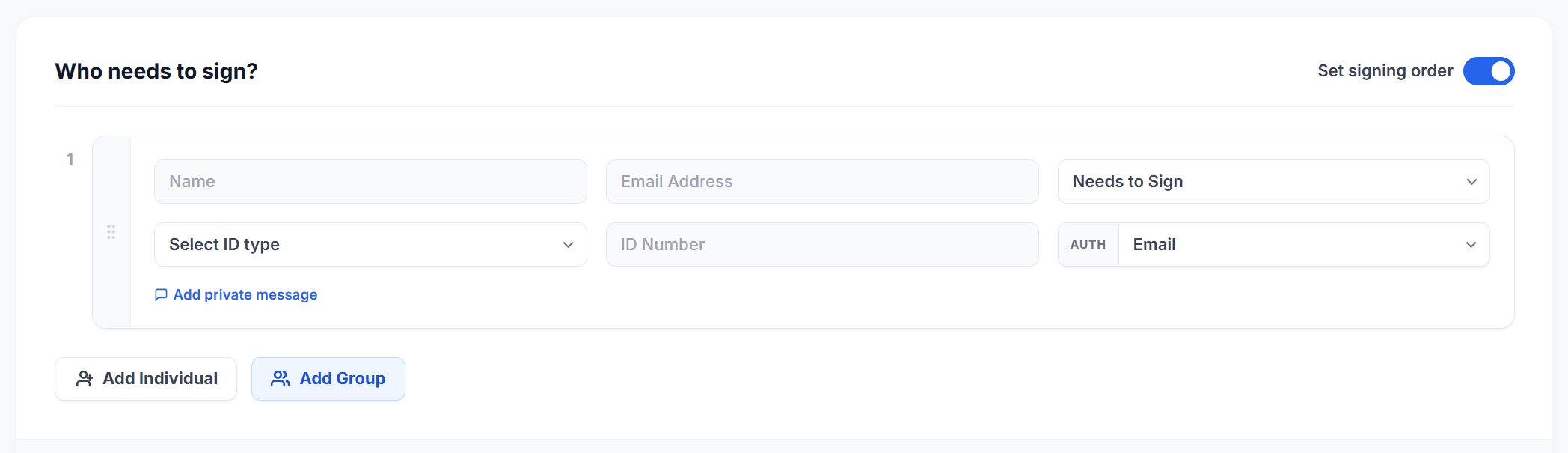
Next, add the people involved in the workflow.
SignDex supports multiple participant roles depending on your process requirements, including:
- Signers
- Approvers
- Acknowledgers
- CC recipients
- Group participants
You can also define signing order and workflow logic to ensure documents move through the correct approval sequence.
This flexibility makes SignDex suitable for both simple and enterprise-level workflows.
Step 3: Place Signature and Input Fields
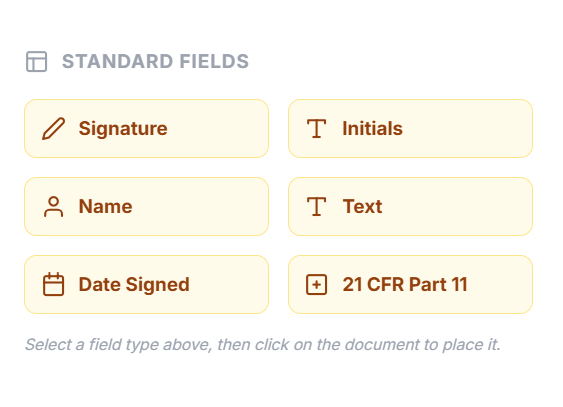
After adding recipients, you can drag and place fields directly onto the document.
Available fields may include:
- Signature fields
- Initials
- Date fields
- Text inputs
- Checkboxes
- Acknowledgement fields
SignDex visually guides recipients to the exact areas requiring action, reducing confusion and improving completion rates — especially for long or multi-page documents.
Step 4: Send the Document

Once your workflow is configured, send the document securely to recipients via email notifications.
Recipients can access and complete the document from:
- Desktop computers
- Tablets
- Mobile devices
No printing or scanning is required.
Each participant receives only the actions relevant to them, making the signing experience simple and intuitive.
Step 5: Track Signing Progress in Real Time
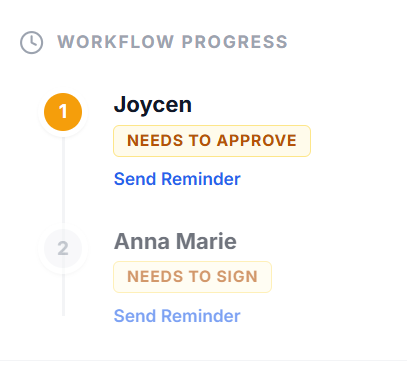
One of the most powerful features of SignDex is workflow visibility.
After sending a document, you can monitor:
- Who has viewed the document
- Who has signed
- Pending recipients
- Completed workflows
- Timestamp activity logs
This eliminates the need for manual follow-ups and helps teams keep workflows moving efficiently.
For organizations handling hundreds or even thousands of documents, centralized tracking becomes essential for operational control.
Step 6: Download the Completed Signed Document
Once all required participants complete their actions, the workflow is finalized automatically.
You can then:
- Download the completed signed document
- Access the audit trail
- Store records securely
- Share finalized copies with stakeholders
This creates a fully digital, traceable, and secure document lifecycle.
Security and Compliance
Security is a critical part of any digital signing platform.
SignDex is designed with enterprise-grade security measures and supports compliance-focused workflows that help organizations meet regulatory and operational requirements.
Features may include:
- Secure authentication
- Tamper-evident records
- Audit logging
- Role-based access controls
- Workflow permissions
- Digital certificate integration support
These capabilities help organizations maintain trust, accountability, and compliance across document processes.
Common Use Cases for SignDex
Organizations across different industries can use SignDex for:
Human Resources
- Employment contracts
- Employee onboarding
- Policy acknowledgements
Finance and Procurement
- Vendor agreements
- Purchase approvals
- Financial authorizations
Legal and Compliance
- NDA execution
- Compliance sign-offs
- Contract approvals
Operations and Administration
- Internal requests
- Department approvals
- Multi-level authorization workflows
Start Your Digital Workflow Journey
Digital transformation is no longer optional for modern businesses. Secure and efficient document workflows are now a core operational requirement.
SignDex helps organizations reduce delays, improve collaboration, strengthen compliance, and streamline approvals through a fully digital signing experience.
Your first digital signature workflow is only the beginning.
With SignDex, document management becomes faster, smarter, and more secure from upload to final signature.